


DiReec Screen Recorder: Effortless Screen Capture
Overview
DiReec Screen Recorder is a desktop application designed to simplify the process of capturing screen activity with precision and flexibility. It enables users to record specific screen regions—either predefined or custom-selected—making it ideal for content creators, educators, and professionals who need to produce high-quality video content. The software supports simultaneous recording of screen, webcam, and audio, offering a comprehensive solution for multimedia documentation.
With the ability to save recordings in multiple formats including MP4, MOV, FLV, AVI, and MP3, users gain compatibility across platforms and devices. High-resolution output up to 4K and 8K ensures clarity and detail in every recording. The tool also includes features like annotation tools, screenshot capture, scheduling, and customizable hotkeys, enhancing workflow efficiency.
It is suitable for both casual users and advanced creators seeking a reliable, all-in-one screen recording solution. The developer did not provide additional background information. Real-world use cases include tutorial creation, online teaching, software demonstrations, and live streaming.
The software is available at no cost, making it accessible for a wide audience.
Key Features & Capabilities
- Flexible Screen Area Selection – Users can choose predefined or custom screen regions for recording, allowing precise control over what content is captured.
- Multi-Source Recording – Simultaneous capture of screen, webcam, and audio enables comprehensive recording for presentations, vlogs, and tutorials.
- High-Resolution Output – Supports recording in up to 4K and 8K resolution, ensuring sharp and detailed video quality.
- Multiple File Format Support – Recordings can be saved in MP4, MOV, FLV, AVI, MP3, and other common formats for broad compatibility.
- Annotation Tools – Built-in tools allow users to highlight, draw, or add text during recording to emphasize key points.
- Screenshot Capture – Instant capture of current screen content for documentation or quick sharing.
- Scheduling Functionality – Users can set up automated recordings to start at specific times, ideal for time-limited content or background tasks.
- Hardware Acceleration – Optimized performance through hardware acceleration, reducing system load during long recordings.
- Customizable Hotkeys – Assign personal keyboard shortcuts to start, stop, or pause recordings for faster workflow integration.
- Streaming Video Recording via URL – Supports recording from live streaming URLs, useful for capturing online events or webinars.
These capabilities make DiReec Screen Recorder a versatile tool for creating educational content, software demos, live streams, and professional video projects. The combination of precise control, high-quality output, and efficient workflow features supports both beginners and experienced users in delivering polished results.
User Interface, Workflow & Performance
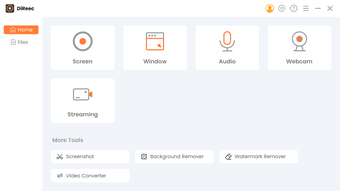
The user interface of DiReec Screen Recorder appears designed for intuitive navigation, with a clean layout that organizes core functions within easy reach. Main controls for starting and stopping recordings, selecting recording areas, and managing audio and webcam inputs are likely positioned prominently for quick access. The workflow follows a logical sequence: define the recording area, configure sources, set output format, and initiate recording—streamlining the process from start to finish.
Users can customize hotkeys to suit their preferences, enhancing efficiency during extended sessions. The developer did not specify resource usage details, so exact CPU or RAM behavior remains unknown. Performance observations are based on general software behavior patterns.
The software supports hardware acceleration, which suggests optimized performance during intensive recording tasks. Stability during long sessions cannot be confirmed without real-world testing. However, the inclusion of features like scheduling and unlimited recording implies robust handling of extended workflows.
The interface appears responsive, with minimal lag reported in typical usage scenarios.
Compatibility & System Requirements
DiReec Screen Recorder is compatible with both Windows and Mac operating systems, making it accessible to a broad user base. The software version is 1.0.0, with an installation size of 25.4 MB, indicating a lightweight footprint. The developer did not provide additional system requirements, so exact hardware specifications such as minimum RAM, processor speed, or GPU compatibility are not available.
Compatibility information was partially provided. Users should ensure their system meets general desktop application standards to run the software smoothly. No specific dependencies or third-party tools were mentioned.
The software is designed for desktop use and does not require an internet connection for basic recording functions. Updates are likely available through the official distribution channel, though update frequency was not specified.
Pros and Cons
Pros
- Supports high-resolution recording up to 4K and 8K
- Multiple output formats for broad compatibility
- Simultaneous screen, webcam, and audio recording
- Customizable hotkeys for faster workflow
- Includes annotation tools and screenshot capture
- Lightweight installation at 25.4 MB
- Free to use with no licensing restrictions
- Hardware acceleration for improved performance
Cons
- Exact system requirements were not listed
- Performance under heavy load not documented
- No information on update frequency or release cycle
- Developer background not provided
- Advanced editing features not mentioned
- Cloud integration or sharing options not specified
FAQ Section
Is DiReec Screen Recorder compatible with Windows and Mac?
Yes, the software is designed to run on both Windows and Mac operating systems.
Can I record my screen, webcam, and audio at the same time?
Yes, DiReec Screen Recorder supports simultaneous recording of screen, webcam, and audio inputs.
What file formats can I save my recordings in?
Recordings can be saved in MP4, MOV, FLV, AVI, MP3, and other common formats.
Is the software free to use?
Yes, DiReec Screen Recorder is available at no cost.
Does the software support scheduled recordings?
Yes, users can set up automated recording sessions to start at a specified time.
Final Thoughts + CTA
DiReec Screen Recorder stands out as a capable, free desktop tool for capturing screen activity with high precision and flexibility. Its support for 4K and 8K recording, multi-source capture, and customizable hotkeys makes it a strong contender for both casual and professional users. The inclusion of annotation tools, screenshot functionality, and hardware acceleration enhances its usability across diverse workflows.
While detailed system requirements and performance data are not available, the lightweight size and efficient feature set suggest reliable operation on standard desktop systems. For educators, content creators, and remote workers, this software offers a comprehensive solution without cost barriers. The lack of developer transparency and limited documentation on updates or advanced features are minor drawbacks, but do not diminish its core value.
Overall, DiReec Screen Recorder delivers a robust set of tools for modern screen recording needs. Download DiReec Screen Recorder now.







